Sublime Text 2 is a text editor for OS X, Linux and Windows, currently in beta.

 Make font resize specific to window in focus

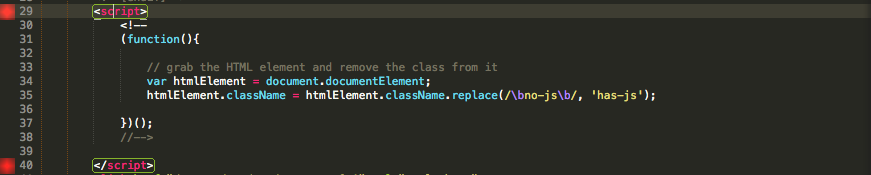
 Red squares next to the line numbers - Build 2113

Document handle in the title bar on OSX does not update if it is changed via focus group.

User Global.sublime-settings not working
I'm new to sublime and I can't get the user settings to work. I know I'm using the correct file because it checks syntax when I save it. I'm bringing up the file with "Global Settings - User" menu in preferences.
My file contents follow. None of the options do anything ...
{ "highlight_modified_tabs": true, "tab_completion": true, "wrap_width": 100, "word_separators": "./\\()\"'-:,.;<>~!@#%^&*|+=[]{}`~?", "rulers": [100], "highlight_line": true, "match_brackets_angle": true, "default_line_ending": "unix"}

Grayscale font hinting too bleak (Win XP)
Not sure if it is a bug, but when rendering text with `DejaVu Sans Mono` (and pretty much any other font, which is not "crisp") and using grayscale hinting under Windows XP, the letters appear to be lighter and bleaker, than in, say, Netbeans, Notepad++, Firefox, using the same font family, size and color.
At first I thought it has something to do with DPI I use (106 currently), but it appeared not to be the case (besides, the font is rendered of the same size, just lighter).

HTML suggested tag format
{New Cursor Position}</tagname>

In the sidebar, highlight the selected views for all groups

Default file settings are lost on application updates
I have to enter in my custom settings for Prefs > File settings - default every time the application is updated, which is almost daily.

If you place your settings in the User File Settings, then this won't happen.
The defaults are intended as a reference, rather than something that should generally be edited.
button4 and button5 mouse bindings do not work on linux

Служба підтримки клієнтів працює на UserEcho


