Sublime Text 2 is a text editor for OS X, Linux and Windows, currently in beta.

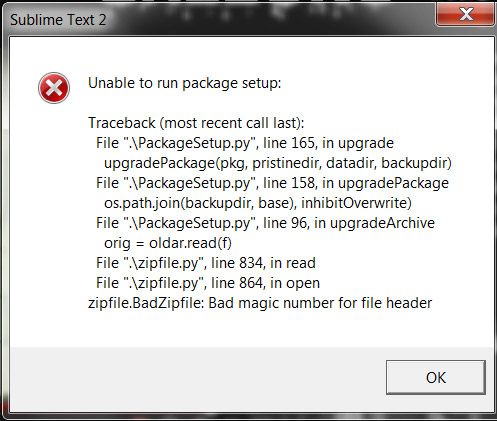
 Windows 7 Error: "Unable to run package setup"

 Easier way to get/set settings on a per-buffer basis
Occasionally, I'm editing a file of a particular type, and I want to use a custom setting just for that buffer. For example, I might want to enable word wrapping at column 60 in a particular buffer. I do a web search to look up the console command to do this:
view.settings().set('word_wrap', 60)
I never remember this incantation and have to look it up each time I want it. Other editors, such as vim, have a much simpler way:
set VARIABLE=VALUE
Perhaps a similarly lightweight way to specify custom settings on a per-buffer basis can be added to Sublime Text 2?

Comments syntax coloring bug

Reindent lines bug in Javascript
1. "Indentation:Reindent lines" does get confused by lines with faulty indentation...
In the example below i have "Tab size set to 4" and "Indent using spaces set"
2. Another bug in the "Indentation:Reindent lines" function: it gets confused by comments.
// Before
namespace('lala', function() {
initialize: function() {
_debug("lala1"); // only indented by two spaces!
_debug("lala2");
}
});
// After "Indentation:Reindent lines"
namespace('lala', function() {
initialize: function() {
_debug("lala1"); <-- still only two spaces
_debug("lala2");
}
});
// Expected but not actual
namespace('lala', function() {
initialize: function() {
_debug("lala1"); // only indented by two spaces!
_debug("lala2");
}
});

Relate projects to folders

Difficult to see/access the directory that a file is in

Matching braces doesn't quite work with CSS
#foo {
}
When writing the first line and pressing enter the second brace is inserted, but the cursor moves *before* this brace. It would make more sense to insert a newline, indent that line and move the cursor there.


Line Highlight bug?

Ubuntu 10.10 - minimap doesn't scroll horizontally
On Ubuntu 10.10 with Sublime 2, I can only scroll vertically with the minimap.

Delete Non-Empty Folders Linux
Servicio de atención al cliente por UserEcho


