Sublime Text 2 is a text editor for OS X, Linux and Windows, currently in beta.

 Expand Selection to Matching Regular Expression
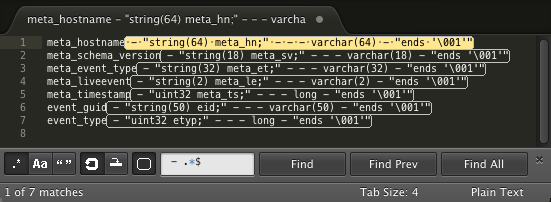
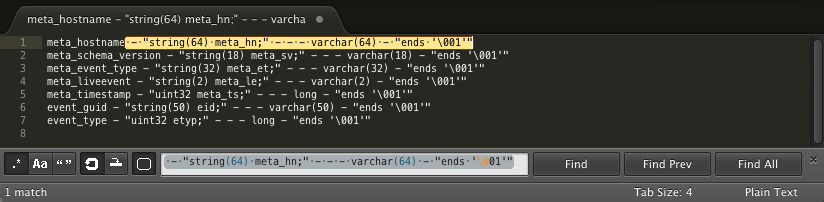
Currently, you can select some text, hit Command-D and expand the selection to include other words that are the same. It would be nice if you could type a regular expression and press Command-D to expand the selection to other patterns that match the regular expression.
Right now, when you hit Command-D with a regular expression, Sublime Text reinterprets the selection as the literal value of the first found entry.
Before Command-D:
After Command-D:

Option to change ruler color
I would be nice to be able to set a global color for the rulers, or better yet, a color per ruler.

Option to include "binary" files in Find in Files

Transparent Command Palette
The command palette is awesome, but it's a bit obtrusive. It would be really nice if I could set the level of transparency on it.

Add rename option to tab context menu

 If setting "scroll_past_end" is true, allow for minimap to scroll past end as well

Embedded webkit for live preview and enhanced widgets
1, A live preview would be nice. I know a lot of people are very tied to it. I don't need this all the time, but sometimes it is handy.
2, Enhanced, form based tools. Here's where I think getting an embedded version of Webkit would really make Sublime shine. Building out a form based plugin which could have validation, if/then logic, etc. For example, some CSS3 gradient tools would be great and have it paste the code directly in the editor when you're done. Having the option to run the files local or online would be good too. We could build out a "sublimeaddons.com" which hosted multiple "tools" which users could build on and quickly get within sublime.
Also posted here: http://www.sublimetext.com/forum/viewtopic.php?f=4&t=1573

Improve vertical/column selection with keyboard

Ctrl+R function list in alphabetical order (maybe a setting)
I work in a code base where people put functions in random order. It would be really helpful to me if I had a setting to show the function list that Ctrl+R brings up in alphabetical order. This is pretty much the only feature I miss from my last IDE, it's a little painful not to have a way to see the functions in the current file in alphabetical order.

Show the same open file in multiple panes
It is currently possible to open the same file in multiple WINDOWS. However, this has different behavior; e.g. two separate buffers are opened, so edits in one do not reflect in the other until the file is saved and re-synched in the other.
There are also other issues when you just scan (rather than open) the same file in multiple panes. I opened a separate bug for those.
Служба підтримки клієнтів працює на UserEcho


