Sublime Text 2 is a text editor for OS X, Linux and Windows, currently in beta.

 Add configuration / parameters for join_lines command

 Quotation autocomplete should not be on by default
In most languages, it is hard enough to properly escape strings as it is. It rarely helps for a text editor to insert extra quotes.
If I place my cursor at the end of this string and tap a single quote:
"did he fire six shots\"or'only five'\""
...it is aggravating to suddenly see:
"did he fire six shots\"or'only five'\""''
It is a severe enough issue that I often edit complex strings outside of Sublime, because this "help" of throwing in single or double-quotes just means "now I have two problems" When you're starting at a line with a dozen quotation marks it's not so easy to discern whether Sublime added one of them.
To be clear, I'm not referring to the behaviour where start and end quotes are added to currently selected text - *that* feature makes much more sense than deleting the selected string. What does not make sense is to add two quotes to the *end of a line* when I only typed one - that has helped me exactly *never* times.
Like a doctor, Sublime should "do no evil" and quietly slipping in a quotation mark when I'm not looking just makes my code buggy. It's frustrating behaviour for an otherwise excellently designed program :)

Lookup documentation for class, method, or other symbol definition
It would be great to have such a feature, specially if it could be presented to us from a pretty popup window or something else (like in many textmate bundles), at least for the most used languages used by text editor's fans (python, ruby, c, perl, php ...)

Make Sublime Text run in X11 without a window manager (kiosk mode)
I have a Chromebook Pixel that I'd like to use for development. I'm interested in trying Sublime, but don't want to futz with a separate window manager. Instead, I'd like to have Sublime open in its own fullscreen X-window session. I can do everything else in ChromeOS.
I tried:
exec subl
in ~/.xinitrc, which almost worked, except the window was the wrong size. It looked like it was only taking up the first 640x480 of my display. (Sorry I can't provide more accurate measurements.)
Is there a command line option to tell Sublime how big to draw itself? I know this sounds like an obscure use case, but non of the Linux window managers look very good at high resolution, and the only thing I even need a separate Linux environment for is running Sublime.

Projet Files Activity Heat Indicator

 self.view.add_regions in TextCommand triggers on_selection_modified Event

OSX: Full screen dock reflection bug.
git diff | sublbut it can be reproduced with
echo "hello" | subl

Highlight the term (after opening a search result) instead of marking the line number

search/multiple selection/ indication in scrollbar like Chrome
I thing that the seach indication in the scrollbar of Crome is great feature.
It will be nice to see it in ST2.
For example after Ctrl+D, Alt+F3, it will be nice to know where are my multiple selection positions.
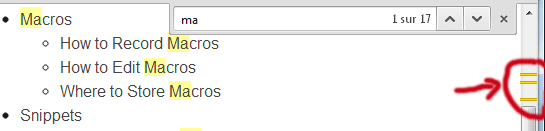
Thanks for the great editor by the way ;)

Feature Request: Drag Tab Into New Instance
The functionality exposed by Chromium / Google Chrome is the perfect example of what I've got in mind.
Сервис поддержки клиентов работает на платформе UserEcho




