Sublime Text 2 is a text editor for OS X, Linux and Windows, currently in beta.

+2

Opening large files on Windows causes excessive BranchCache and Search Indexer usage

Robo210 Robo210 14 lat temu 0
When opening a large file (>4GB, using Windows 64-bit version) off a local hard drive, the progress bar quickly (relatively speaking) gets to 99% then things turn bad. The Windows BranchCache service appears to kick in and start performing large amounts of I/O, and the Search Indexer service appears to start indexing the file. I'm believe one of these services is being triggered by the other, but I'm not sure which. The end result is that the excessive I/O from each brings the entire machine to a crawl, and it takes hours for the file to finish opening (it does successfully open).

Since I have never seen this behavior with other text editors (64-bit VIM, for instance) I suspect Sublime Text is doing something to trigger one (or both) services. Note that seeing BranchCache kick in may require a domain joined machine, but it shouldn't be doing anything in the first place since the file is not being loaded off the network. I have also configured the Search Indexer to not index Offine Files, but this had no effect.
+2

goto symbol in project does not bring up results from SASS / SCSS files

Greenwich 13 lat temu Ostatnio zmodyfikowane przez Matthew Fordham 13 lat temu 1

Currently goto symbol in project does not bring up results from SASS / SCSS files, which would be particularly useful for searching through partials.

+2

Render CJK font

Brant Young 14 lat temu zaktualizowano 14 lat temu 0
When input Chinese characters, Sublime failed to render font.
+2

Goto file should open on the previously opened files, like in Textmate

Henri Morlaye 14 lat temu 0

 It allows users to fast switch between last opened files. Textmate Goto File behaves very well to browse previous files as well as opening any other file.

+2

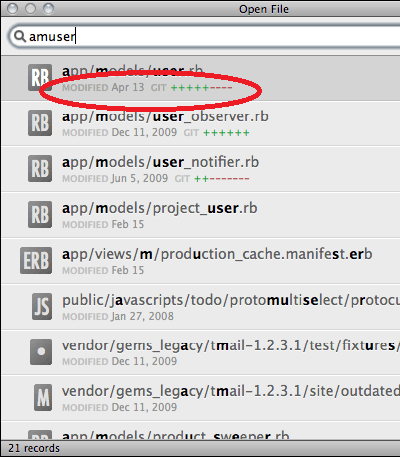
File and git (or whatever) metadata in Goto Anything

Henning Christiansen 14 lat temu 0
A la PeepOpen would be awesome

Image 38
+2

OS Specific Settings Files

Zachary King 13 lat temu 0

We already have this for keybindings, but I would like the other settings files to allow for a (OSX) etc. in the file name to identify the OS, and then have them merged on run. This would be useful for me, since my Mac as a much higher pixel density then my windows computer. This requires bumping up my font size several notches every time I switch computers.

+2

OS X Services integration

Boris Yurkevich 13 lat temu 0

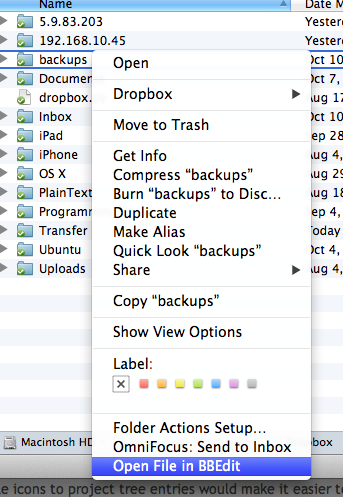
In Finder you must be able to add folder to Sublime project like BBEdit does. Please watch the pic

Image 187

+2

Save a copy as...

a n 12 lat temu 0
It would be nice to be able to save a copy of the open file under a different name, for a backup, and continue working on the file.
+2

Support Emacs-style in-buffer syntax settings

Brian Clapper 14 lat temu w Plugin announcements Ostatnio zmodyfikowane przez Kai Grossjohann 14 lat temu 1
GNU Emacs has a useful feature that allows an individual file to override the default Emacs mode (and, hence, the associated language syntax and colorization) by using a special magic string somewhere in the first non-blank line of the file. For instance, if file foo.C would normally be displayed using C syntax rules, but you want to force Sublime Text 2 to use C++ rules, simply include a comment like this in the first non-blank line of the file:

//           -*- c++ -*-

This feature is useful for overriding the default language on a per-file basis.

I've implemented a plugin that provides this capability. It's in this GitHub repo:
+2

Distraction free mode needs an "ignored_packages" setting

Jared McGuire 14 lat temu zaktualizowano 14 lat temu 0
Distraction free mode needs an "ignored_packages" setting, so that I can enable or disable certain packages for this mode.

I created a plugin that keeps the page vertically centered while you type, similar to the Mac application Writeroom, but I only want this plugin to be enabled for distraction free mode.

Is there some other way to do this, maybe from within the plugin?