Sublime Text 2 is a text editor for OS X, Linux and Windows, currently in beta.
Sarnaseid teemasid ei leitud.

+1
 Tabs shortcuts like in browsers: re-open closed, move tab
We should be able to do like in any browser:
re-open last closed tab : ctrl+shift+t (> 1 level of close)
move tab right-left : ctrl+shift+pageUp/Down

+1
 Drag & drop a file
On Windows i can't drag & drop a file from filezilla to sublime to open it, it worked with previorus version (sublime 2)

+1
Allow deletion of file on right click
More like Notepad++. Sometimes I open a file an realize it is obsolete.

+1
On the tab (which indicates a file) I'd like the ability to do the following: 1) open the folder of the file, 2) Copy the path of the file, 3) Find and select the file in the browser
On the tab (which indicates a file) I'd like the ability to do the following: 1) open the folder of the file, 2) Copy the path of the file, 3) Find and select the file in the browser


+1
Don't toggle the Discreet GPU
ST seems to sometimes toggle the Discreet GPU. This is a drain on the battery, and I don't understand why an app like ST needs such a powerful GPU. Could the next version make sure that this doesn't happen? :)
I'm on a rBMP running OS X 10.8.2.

+1
improve UI for rectangular selection
The current UI for rectangular selection (multiple cursors in ST2) could use some clean up. For instance: different shortcuts are to be used depending on the context:
keyboard entry: ctrl+arrows
multiple-mouse-clicks: cmd+click
mouse-drag: alt+drag
Clearly this is confusing (to say the least). I don't know about others, but (as an old textmate user) I would go with alt in all cases.
In addition I found no way to extend a rectangular selection by using the shift. Namely, I would like to click somewhere in the file, move around as I like without moving the cursor and then with a combo (say alt+shift+click) 'rectangular'-select the portion of text between the cursor and the current click.

+1
Word Wrap never stays on
I have a problem with word wrap turning off occasionally while editing.
Also, is there any way sublime can remember that word press is suppose to be enabled? As in every document I open with have it enabled by default.




+1
C++ function template syntax highlighting
The current C++ syntax highlighting does not handle templated functions very well. 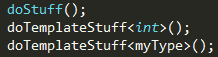
Above, doTemplateStuff would ideally be cyan to make it more readable.
Customer support service by UserEcho