Sublime Text 2 is a text editor for OS X, Linux and Windows, currently in beta.

 auto_complete_commit_on_tab should default to true
The docs state
// By default, auto complete will commit the current completion on enter.
// This setting can be used to make it complete on tab instead.
// Completing on tab is generally a superior option, as it removes
// ambiguity between committing the completion and inserting a newline.
If completing on tab is recognised to be "generally a superior option", which I couldn't agree more strongly with, why is the default enter? The autocomplete is an awesome and very powerful feature, however it does seem a little over enthusiastic and I had to google around to find out how to stop random things appearing at the ends of my lines - I'm sure other people will be doing the same.


 Equal spacing / lining up of variables
Is there a way natively or with a package add-on to evenly space variable definitions within PHP to make them pretty?
e.g.
$this_is_a_variable = $my_value_array['something'];
$a_variable = $my_value_array['something-else'];
$another_variable = $my_value_array['something-more'];
and make it look like
$this_is_a_variable = $my_value_array['something'];
$a_variable = $my_value_array['something-else'];
$another_variable = $my_value_array['something-more'];

 view.show(view.visible_region()) scrolls the view
I'm writing a script to save and restore file positions, and I noticed that, when scrolled to the top of a file,
view.show(view.visible_region())
scrolls the view downward so that the top of the file isn't visible any more.
I can work around this behavior in my script, but it seems incorrect in any case, so I figured I'd report it.

Excluding subfolders in multi-file search
I have a large 3rd party SDK within my project directory. When I do searches through the many libraries for text I very often get a bunch of hits from the 3rd party source code. I'd like to be able to exclude that folder in much the same way as with certain file types (with the -*.txt) for example.

Project name should take priority in the window title
I usually have several different project windows open at a given time for my dayjob, and it would be nice to be able to quickly switch between them with the system's windowswitcher (Alt+Tab in my case). This is currently prevented by the window titles prioritizing file paths over project name, making it difficult to tell what project I'm switching in to.
Keep the status line report of line and column when a selection is made
When a selection is made, the bottom left hand status changes from line / column to number of items selected. This is a pain if trying to line up a selection of text to a tab spacing. Can the selection count be added so that all 3 items are displayed? I really want to know the column number for the above. Currently I have to make a reference point then align a selection to the reference point and then delete the reference point. There is plenty of screen real estate.

Show all types(i.e. line endings) whitespaces in Sublime Text 3
Dear Developers of Sublime Text,
Thank you for your project
Didn't find such common suggestion using search of this web site, thus, there is one.
Is it possible to add such feature to see any types of whitespace characters in text?
An example is shown on image below:
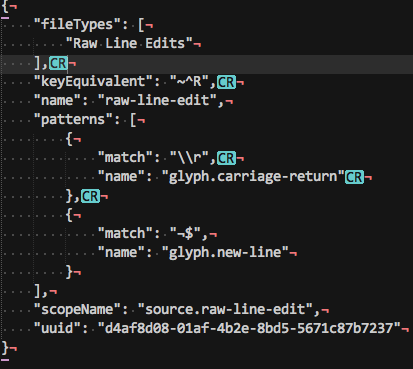
As you may notice, there are return characters shown above which is very helpful sometimes.
It is worth to notice that a package called "RawLineEdit" has already been tried and it didn't work in the result. Thus it would be very wonderful to have such option out of the box.
Best regards

Native Windows 10 on ARM port
With the release of the Surface Pro X it would be nice to have a native Windows 10 on ARM port.

Store currently entered find term in find history
Often I will be typing a complex regex into the find field, and then lose it by accidentally stepping through the history with the up or down arrow. If the last thing to be typed into the Find field could bestored in the history whether it was actually searched or not, that would be helpful. Also I would appreciate different key bindings for stepping through the history since I often seem to do it accidentally.
Customer support service by UserEcho