Sublime Text 2 is a text editor for OS X, Linux and Windows, currently in beta.

 open_dir always uses Explorer.exe - Use python os.startfile() instead to invoke custom Dir Handlers
Many Windows users have Explorer replacements such as Total Commander, XYPlorer, Directory Opus, xplorer2, etc. These usually replace explorer.exe via changing the Folder handler in the registry at: [HKEY_LOCAL_MACHINE\SOFTWARE\Classes\Folder\shell\]
However - even when someone has a custom folder handler setup - SublimeText currently always opens a folder via Explorer.exe and not through an os-specific way. An alternative to fix this that I have tested is to use os.startfile("C:\folderpath"). For example the following will respect the user's custom directory handler:
import sublime, sublime_plugin, os
class OpenContainingDirCommand(sublime_plugin.TextCommand):
def run(self, edit):
branch, leaf = os.path.split(self.view.file_name())
os.startfile(branch)
So please use os.startfile(dirpath) for things such as "Browse Package".

Switch to the new GTK+ File Chooser

Search in the code only (ignore comments)
It would be really nice to have the option to search
in the code only,ignoring any match that comes from the comments.
Please see this stackoverflow post: http://stackoverflow.com/questions/7311870/fulltext-search-ignoring-comments
Use tab to cycle through auto-completions

A pure terminal version, to use on servers (like vi or emacs)

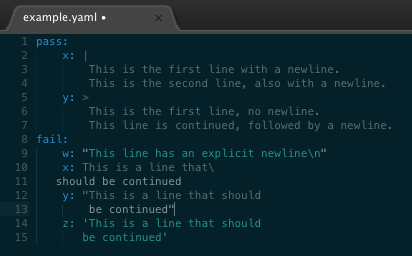
 YAML Parsing Doesn't Follow Continuations
The YAML syntax highlighter doesn't follow lines terminated with slashes, surrounded with single-quotes, or unquoted.
Additionally, tab indentation is an error according to the YAML spec, so the default should be to use spaces.
Example data in screenshot:

goto anything should open with current selection
Signed installers

Clicking on an active tab in another split window does not change focus.

Named Bookmarks
Bookmarks are great. This is a suggestion that adds upon the current bookmarks implementation.
As a user of Sublime Text, I want to be able to name my bookmarks in conjunction with a searchable list of bookmarks so that I can have a method for quickly finding my bookmarks again.
One possibility would be to include bookmark names in the Goto Anything dialog. It might also be useful to have a dialog that shows only bookmarks as well, just in case I want to browse my bookmarks. Maybe something like the file@symbol feature, only for bookmarks, but using another symbol such as # (like an href). Examples:
- "file#mybookm" looks for all bookmarks in 'file' that match "mybookm"
- "#mybookm" searches all bookmarks in all files for "mybookm"
- "#" displays all bookmarks
Customer support service by UserEcho