Sublime Text 2 is a text editor for OS X, Linux and Windows, currently in beta.
No similar topics found.

-1
 Browse for Folder Dialog - Clipboard
Would be nice if the default 'Browse for folder' location was the path I had on the clipboard if any.

-1
 Bug in multiline commenting
If I select the following code below and press Ctrl-* to comment the whole block, ST2 only uncomments this line /* Disable master mode and enable as slave with SLA */.
void aery::twi_init_slave(uint16_t sla)
{
	/* Software reset. */
	aery::twi->CR.swrst = 1;
	while (aery::twi->CR.swrst);

	/* Disable master mode and enable as slave with SLA */
	aery::twi->SMR.sadr = sla;
	aery::twi->CR.msdis = 1;
	aery::twi->CR.sven = 1;
}
Result:
void aery::twi_init_slave(uint16_t sla)
{
	/* Software reset. */
	aery::twi->CR.swrst = 1;
	while (aery::twi->CR.swrst);

	 Disable master mode and enable as slave with SLA
	aery::twi->SMR.sadr = sla;
	aery::twi->CR.msdis = 1;
	aery::twi->CR.sven = 1;
}
Expected result:
// void aery::twi_init_slave(uint16_t sla)
// {
// 	/* Software reset. */
// 	aery::twi->CR.swrst = 1;
// 	while (aery::twi->CR.swrst);

// 	/* Disable master mode and enable as slave with SLA */
// 	aery::twi->SMR.sadr = sla;
// 	aery::twi->CR.msdis = 1;
// 	aery::twi->CR.sven = 1;
// }

-1
"z" key misbehaving in Vintage insert mode
I'm using Sublime Text 2, build 2139, on Ubuntu linux 11.10.
When I enable Vintage and enter insert mode, I am unable to type two consecutive z's. The second z is causing Sublime to replace the previous letter. So, for example, if I type "pizza", I will get "pia". However, type "size" has the expected result. Disabling Vintage alleviates the problem, but then I lose all my wonderful Vi shortcuts, which makes me very sad :(

-1
Bug of replacing text when "preserve case" is active.
Find What: dddWooID
Replace with: eeeID
However, the result is eeeId
Please fix it. I am using 2.0.1 Build 2217. Thank you.

-1
Using tag#with-hyphen doesn't work.
Would it be possible allow hypens when using tag#with-hyphen/tag.with-hyphen like in the snippets? As we use it as a common naming convention for css styles.
Also great work mate love this editor more and more.
Also great work mate love this editor more and more.

-1
Make escape set focus on sidebar when focus is set on the editor
Currently escape has no function while the focus is on the editor and no panels are open.
It is possible to change the keymap to achieve this by verifying negatively if all the other possible contexts for the escape key are not met.
This is very cumbersome and doesn't provide compatibility should new cases for the use of escape be added to the keymap file in future versions.
Would be nice to have a key which indicates if the focus is set on the text editor so the context of the escape key could be set in a affirmative manner.
Anyway, this doesn't really work because escape is hardset to take focus from the sidebar so it only gains focus momentainly and then goes away..

-1
Force sublime text 2 not to load python files under a plug-in's directory
Is there a way to tell sublime text 2 not to load certain files from my plugin directory? Either not load files under a certain directory (blacklist), or "only load these files" (whitelist).
Thanks,
Filipe
Thanks,
Filipe

-1
Italic rendering does not work properly with the font I use
Hi there,
The new italic rendering of text does not work with the font I use, making the text unreadable.
Each italic character seems to take double the space, as you can see on the screenshot below:
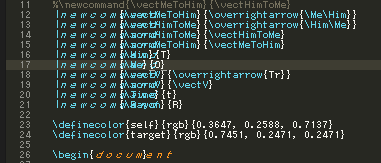
The font is HobTiny, you can download it for free:
http://dr-hoiby.com/res/HobTiny.php
I think it only works on Windows.
Thanks for the amazing work
William Ledoux

-1
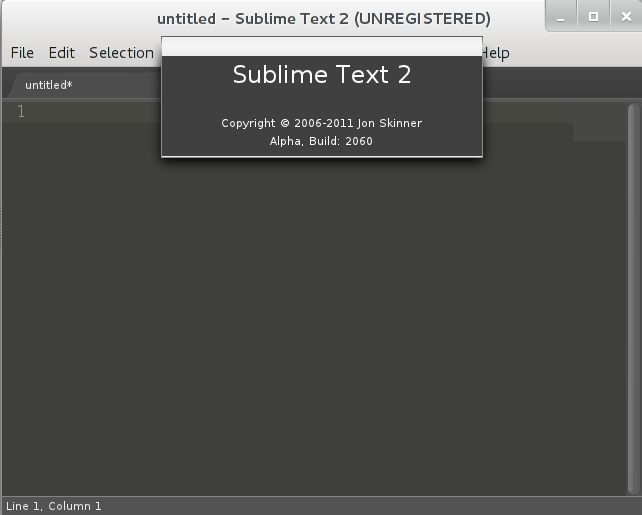
The about box isn't closeable in Gnome 3
There is no close button or anything. I think this may be due to Gnome
3's new style for displaying dialog boxes. Strangely, it is possible to
right-click on the mini-titlebar of the about box and close it from
there. Of course, this is neither obvious nor ideal...

-1
Support for multi-user environment ($SUBLIME_DATA)
Today we can launch Sublime Text with --data to use a custom data dir location. It would be good to have the option to set for example $SUBLIME_DATA to a custom location to make this change "permanent".
This would make it easier to use Sublime Text in a multi-user environment (like a Citrix/VNC terminal service type of corporate environment) where only one central installation of Sublime is present and each user have their own data directory.
This would make it easier to use Sublime Text in a multi-user environment (like a Citrix/VNC terminal service type of corporate environment) where only one central installation of Sublime is present and each user have their own data directory.
Customer support service by UserEcho


